

- HOME
- Work Inspection Camera
- Application Example
- Batch inspection using multiple cameras
Batch inspection using multiple cameras [RICOH SC-20 in-house case study]
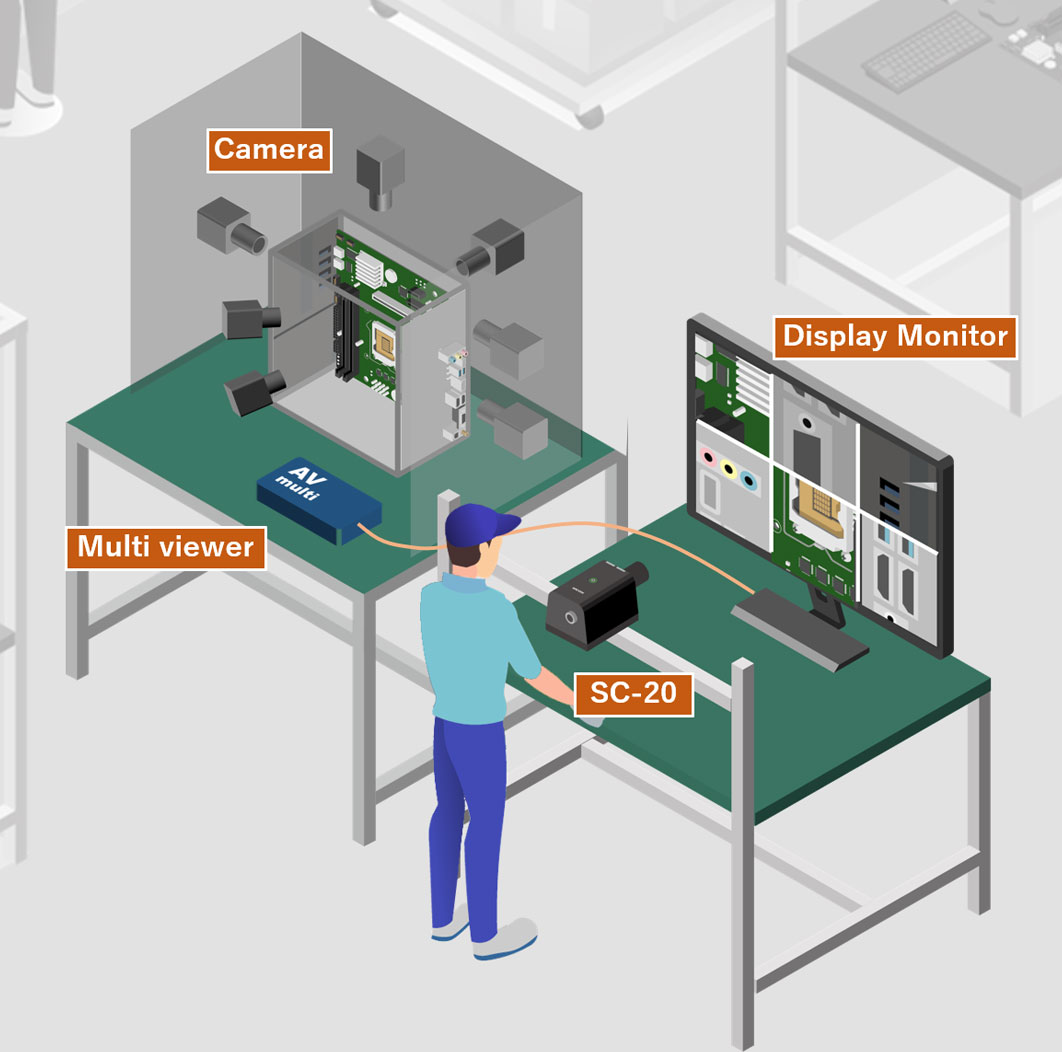
This is a case study of a single SC-20 unit inspecting multiple images captures by cameras set at different directions.
This was achieved by utilizing a HDMI device that generates multiple images, and a display to be used as an inspection object.
This example shows SC-20 being applied to inspect a three-dimensional object, which is usually difficult to inspect solely with SC-20, by combining a variety of additional devices.
Inspection Method
SC-20 is basically a product that inspects assembly objects by directly capturing images with a camera mounted inside the main unit.
However, since there are no limits to the objects that can be captured by the camera, as long as the image difference is recognizable, it is also possible to inspect the display of visualized images.
Utilizing this property, a system was constructed to inspect images captured from multiple cameras at various angles, being displayed on multiple LCD monitor, using the SC-20's “shape” matching mode.


Effects after the Installation
Issues before the installation
- Since it is difficult for the SC-20 to inspect three-dimensional objects, which can only be inspected from one direction, the inspection was done manually.
- While it may be possible to inspect the products by switching the angle toward SC-20, heavy products have a large load and a high risk of misalignment.

Improvements made after the installation
- Multiple inspection points can now be inspected in one step after setting the product at a fixed position.
- The inspection errors that occurred with manual inspections are eliminated, suppressing the outflow of defective products.
- Worker man-hours are reduced and takt time is greatly improved.
